How to Read IRS Transcript: Complete Guide for Clarity
Reading an IRS transcript is all about knowing which type you're looking at and what the key sections and codes actually mean. Think of it as an official summary of your tax account. Once you get the hang of reading it, you can easily verify your income, apply for loans, or just check on the status of your return.
Your First Look at an IRS Transcript
Let's be honest, opening an IRS transcript for the first time can feel a little intimidating. It’s a dense document, packed with codes, dates, and terms you’ve probably never seen before.
But this isn't just bureaucratic paperwork; it’s the definitive story of your financial relationship with the IRS for a specific tax year. Learning to read it is a surprisingly useful skill for some of life's biggest financial moments.
It's essentially the IRS's internal records, made visible to you. It might be a snapshot of your tax return as it was processed, a running list of everything that's happened on your account, or a combination of both. For some foundational strategies on how to tackle any complex document, you might find it helpful to explore ways to improve reading comprehension.
Why Do You Need a Transcript Anyway?
Most people don't pull their transcripts just for fun. You'll likely need one for reasons that go far beyond simple curiosity. Lenders for mortgages and student loans almost always ask for them to verify your income and confirm you've actually filed your taxes. For them, it's the gold standard of financial verification.
You might also find yourself needing a transcript to:
Prepare an Amended Return: It shows the exact figures from your original filing, giving you a clean and accurate starting point for any corrections.
Resolve an IRS Notice: If you get a letter from the IRS, understanding your account's history is the very first step in figuring out what's going on and how to respond.
Plan for Tax Debt: If you owe the IRS, the transcript details every penalty and all the accrued interest.
This infographic breaks down some of the most common reasons people request their IRS transcript.
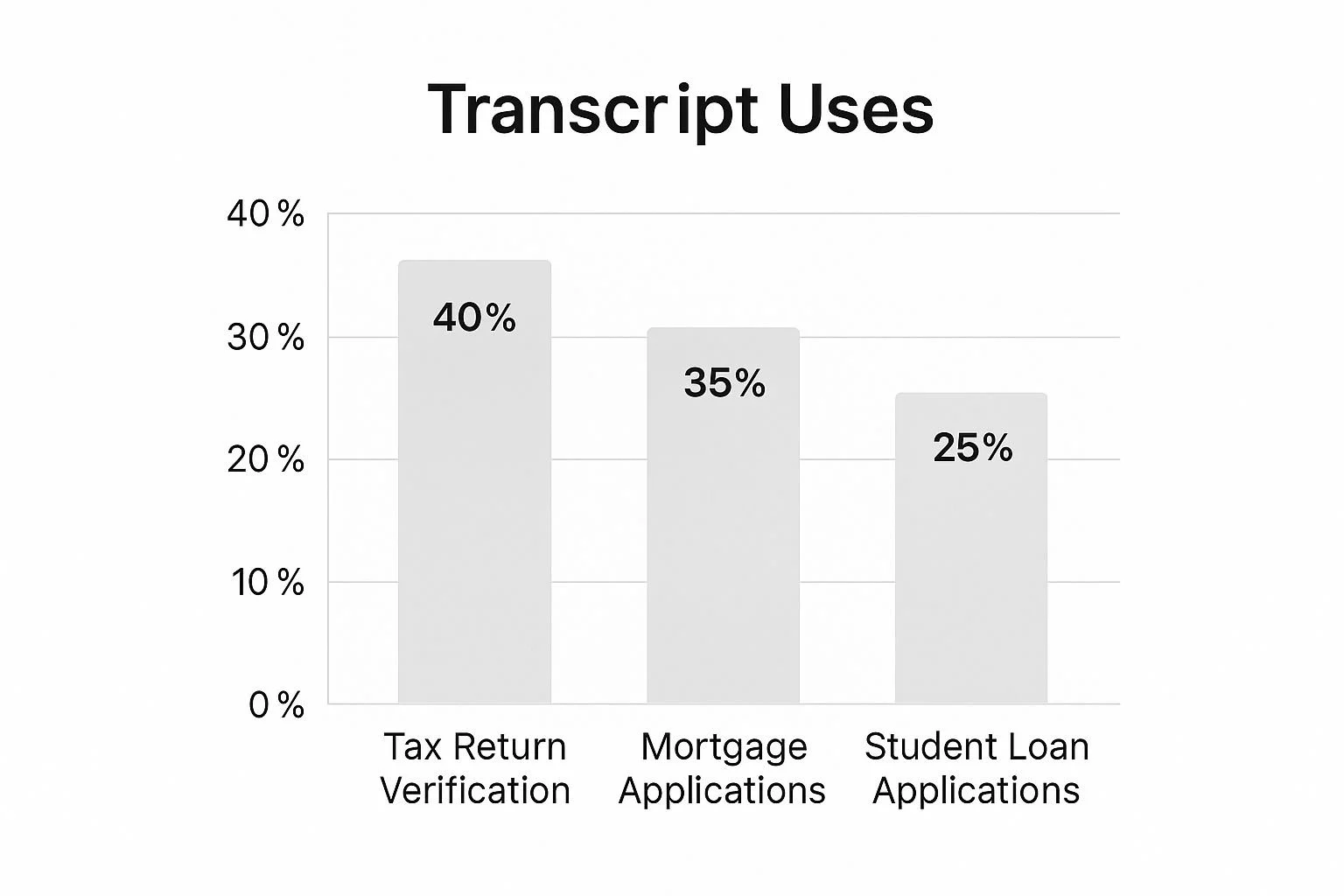
As you can see, verifying tax returns and securing loans for major purchases like a home or for education make up the lion's share of transcript requests. It just goes to show how important these documents are in major financial transactions.
Navigating the world of IRS transcripts can feel a bit like ordering from a secret menu if you don't know the options. Requesting the wrong document is an easy mistake to make, and one that can cause some serious delays.
To get what you need, you first have to understand what each transcript is for. They all pull from your tax records, but they show very different pieces of the puzzle. Let's break down the four main types so you can grab the right one on the first try.
The Four Main Transcript Types
The IRS offers a few different flavors of transcripts, each designed for a specific purpose. Whether you're applying for a loan or sorting out a tax issue with a pro, picking the right one is key.
Here’s a quick rundown of the four main types you can request:
Tax Return Transcript: This is probably the most common one. It gives you a summary of most of the line items from your original tax return, like your Adjusted Gross Income (AGI). It doesn’t show any changes made after you filed, but it's a clean, simple summary of what you reported. Lenders often ask for this to verify your income.
Tax Account Transcript: Think of this one as your account's diary. It shows all the activity for a specific tax year—payments you've made, penalties that have been added, or adjustments from an audit. If you're trying to figure out why you owe money or want to confirm a payment was applied correctly, this is the transcript you need.
Record of Account Transcript: This is the big one. It’s a combination of both the Tax Return Transcript and the Tax Account Transcript. You get the full picture in one document: what you originally filed plus every single transaction that has happened since. It's comprehensive, but often more detail than you actually need.
Wage and Income Transcript: This transcript is a lifesaver if you're missing a W-2 or 1099. It lists all the income information the IRS has received for you from third parties—employers, banks, clients, etc. It's fantastic for double-checking that you've accounted for all your income before you file.
For business owners, staying on top of your company’s tax filings is just as crucial. The IRS has been working on better tools for this.
Which IRS Transcript Should You Request?

To make it even clearer, I've put together a simple table that lines up the four transcript types and shows you what they're best used for.
| Transcript Type | What It Shows You | Best For These Situations |
|---|---|---|
| Tax Return Transcript | A summary of your original tax return (Form 1040, etc.), including AGI. | Applying for mortgages, student loans (FAFSA), or any income verification needs. |
| Tax Account Transcript | A chronological list of account activity, including payments, penalties, and adjustments. | Resolving IRS notices, tracking payments, or working with a tax professional on an issue. |
| Record of Account Transcript | A combination of the Tax Return and Tax Account transcripts in one document. | Complex tax situations where you need to see both the original filing and all subsequent activity. |
| Wage and Income Transcript | Data from all third-party information returns, like W-2s, 1099s, and 1098s. | Preparing your tax return when you're missing documents or verifying all income has been reported. |
Choosing the right document from the start saves you—and whoever you're sending it to—a lot of time and confusion.
Matching the Transcript to Your Needs
Knowing the definitions is great, but let's see how this plays out in the real world.
Let's say you're applying for a mortgage.
Your lender needs proof of the income you reported for the last two years. They don't really care about a $50 late payment penalty from last year; they just want to see the AGI from your filed return to confirm it matches your application.
In this case, the Tax Return Transcript is exactly what you need. It’s clean, simple, and gives the lender the specific numbers they're looking for without any extra noise.
Now, imagine you've hired a tax attorney to help with an IRS notice.
Your attorney needs to see the whole story. When was your return officially processed? When did the IRS send the notice? Were penalties and interest calculated correctly?
For this, the Tax Account Transcript is non-negotiable. It provides the play-by-play of transaction codes and dates that lets your representative see exactly what happened, when it happened, and how to fix it.
By taking a moment to match the transcript to your specific goal, you can cut through the clutter and get straight to the information that matters.
Making Sense of Your Tax Account Transcript
The Tax Account Transcript is where the real story of your tax year unfolds. Honestly, it's where most people get overwhelmed. It’s a chronological log of every single action on your account for a specific tax year. Think of it less like a summary and more like a detailed financial diary kept by the IRS.
This document goes way beyond the numbers you reported on your Form 1040. Instead, it shows you what the IRS did with that information, when they did it, and what's happened since. It’s the absolute key to understanding your refund status, payment history, and any notices you might have received.
Navigating the Key Sections
When you first pull up a Tax Account Transcript, your eyes are probably drawn straight to the long list of transactions. Before you dive in there, let's start at the top. You'll find some crucial summary information that provides context for everything else.
Here’s what you should look for first:
Account Balance: This is the current bottom line—the amount you owe for that tax year, including any penalties and interest that have been calculated up to a recent date.
Accrued Interest and Penalty: These lines break out the specific interest and penalty amounts that have been tacked on to your balance. You'll also see a date showing when they were last calculated.
"As of" Date: This is a vital yet often misunderstood date. It simply tells you that all calculations for penalties and interest are current up to this point. It is not a payment deadline.
Getting a handle on these top-line figures gives you an immediate financial snapshot before you get lost in the transaction codes that explain how you got there.
Decoding the Transaction Log
The heart of the transcript is the "Transactions" section. This is a running list of events, each with a date, a description, and a three-digit transaction code (TC). The real secret to reading an IRS transcript is knowing what these codes mean.
Let’s walk through a common sequence you might see on your own transcript, especially if you filed your return and are expecting a refund.
First, you'll see Code 150 - "Return Filed". This is the first major entry you’ll look for. It confirms the IRS has processed your return and officially recorded your initial tax liability. The dollar amount next to it is the total tax you were responsible for based on your filing.
Next up are the codes for your credits and payments. You'll see things like TC 806 for tax withheld from your paychecks or other payments and credits you claimed. These always show up as negative numbers because they reduce what you owe.
Finally, the one everyone is waiting for: Code 846 - "Refund Issued". This code is the green light. It means your refund has been approved and sent. The date listed next to this code is the exact day the IRS either mailed your check or sent the direct deposit.
A common point of confusion is seeing a future date next to Code 846. This is perfectly normal. It just means your refund is scheduled to be released on that specific date.
Understanding Delays and Account Freezes
Of course, sometimes things don't go quite so smoothly. You might see codes that point to a delay or a problem brewing.
Code 570 - "Additional Account Action Pending": This is a generic code that essentially puts a freeze on your account. It means the IRS needs to review something on your return before it can keep processing it. It doesn’t automatically mean an audit, but it definitely means a delay.
Code 971 - "Notice Issued": This code usually pops up right after a Code 570. It confirms that the IRS has mailed you a letter to explain the delay or ask for more information.
If you find yourself staring at these codes and facing a potential tax debt, it helps to understand all your options. For more complex situations involving collections, you can get detailed information on the IRS Form 433-F, which the IRS uses to gather your financial information. Mastering your transcript helps you anticipate what the IRS might ask for next.
Alright, let's break down the language of your IRS transcript. Think of those three-digit codes as the IRS's internal shorthand, telling the story of your tax account. Each one signifies a specific action—a payment, a penalty, a notice, or a refund.
Getting a handle on these codes is the single most important step to truly understanding what's happening with your taxes. Some are pretty straightforward, like a TC 150 code, which just means your Return was Filed. But others can be a bit more cryptic, signaling anything from a minor hiccup to a more serious review.
Let's dig into the codes that tend to cause the most confusion and what they actually mean in the real world.
Audit and Examination Codes: What to Look For
Seeing an examination code pop up on your transcript can definitely make your heart skip a beat. But it’s not always a sign that a full-blown audit is about to land on your doorstep. It simply means a pair of human eyes at the IRS is taking a closer look at something on your return.
TC 420 - "Examination of Tax Return": This is the big one. When this code appears, it means your return has been pulled from the pile and formally sent to the examination department for review. It doesn't guarantee you'll be audited, but it's the official starting pistol for that process.
TC 424 - "Examination Reconsideration": This code is different. You'll typically see this only if you’ve already been through an audit and have asked the IRS to reconsider their findings, perhaps because you have new information to provide. It's their way of saying, "We got your request and are looking at it again."
So, while a TC 420 is an alert that the IRS has initiated a review, a TC 424 is usually a sign that you, the taxpayer, have prompted them to take a second look.
When the IRS Adjusts Your Tax Bill
It's not uncommon for the IRS to make changes to your tax liability after you've already filed. This can happen for all sorts of reasons—maybe they caught a simple math error, or you forgot to include income from a 1099 form they received.
The key takeaway with adjustment codes is that they directly impact your account balance. The dollar amount next to the code will tell you whether your tax bill went up or down.
A common example is TC 290 - "Additional Tax Assessed" with an amount like $500.00. This means your total tax owed for that year has officially gone up by $500. It often follows an automated check (like the forgotten 1099) or a more formal review process.
Here are a couple of other adjustment codes you might see:
TC 300 - "Additional Tax Assessed by Examination": This is a lot like a TC 290, but it specifically confirms that the extra tax is the direct result of a formal audit.
TC 291 - "Abatement of Prior Tax Assessment": Now this is the one you want to see! It means the IRS has reduced a tax they previously charged you. It will show up as a negative number on your transcript and is always good news.
Understanding the Dreaded "Freeze" Codes
Freeze codes are exactly what they sound like—they stop everything dead in its tracks, especially your refund. When you see a freeze code, it’s a clear signal that all activity on your account is on hold until a specific issue is sorted out.
The most common freeze code by far is Code 570 - "Additional Account Action Pending". This is a catch-all hold that can be triggered by almost anything, from a simple name mismatch with the Social Security Administration to a more complex issue that requires manual review.
Almost without fail, shortly after a TC 570 appears, you'll see a TC 971 - "Notice Issued". This is the IRS's way of telling you a physical letter is in the mail. That letter will explain why there's a hold on your account and what, if anything, you need to do about it. Seeing these two codes together is your cue to start checking your mailbox religiously.
To help you quickly decipher what's going on, here’s a quick-reference table for some of the most common transaction codes you'll encounter on your transcript.
Common IRS Transaction Codes Translated
| IRS Code | Plain English Meaning | What You Should Do |
|---|---|---|
| 150 | Tax Return Filed & Processed | Nothing. This is a standard entry showing your return is in the system. |
| 846 | Refund Issued | Check your bank account or mailbox. Your refund is on its way. |
| 570 | Account Hold / Action Pending | Wait for a notice from the IRS or for the hold to be released. |
| 971 | Notice Issued | Check your mail for an official letter from the IRS within 2-3 weeks. |
| 420 | Return Selected for Examination | Be prepared for potential audit correspondence. You may want to consult a tax pro. |
| 290 | Additional Tax Assessed | Review the notice you receive to understand why. Pay the amount due by the deadline. |
| 766 | Credit to Your Account | Good news! This is a tax credit (like for a child or education) reducing your tax. |
| 768 | Earned Income Credit | This is the specific code for the Earned Income Tax Credit (EITC). |
This table isn't exhaustive, of course, but it covers the main codes that tell the story for most taxpayers. Knowing what they mean can take a lot of the stress and guesswork out of reading your transcript.
Making Sense of Your Transcript in the Real World

Alright, we've broken down the codes and sections, but let's be honest—theory only gets you so far. The real test is seeing how all this information plays out in a situation you might actually face. Let's walk through a couple of common scenarios to connect the dots between those cryptic codes and your financial life.
Once you see how these pieces fit together in practice, you'll feel much more confident pulling and reading your own transcript, whether it's for something exciting like a new home or something stressful like an IRS inquiry.
Scenario 1: Applying for a Mortgage
You're in the home stretch of buying a house. It's an exciting time, but then your mortgage lender asks for your tax transcripts from the past two years to verify your income. What are they actually looking for?
They aren't trying to find a needle in a haystack. Lenders just need clean, clear data to confirm what you put on your loan application.
When a lender pulls your Tax Return Transcript, they have a mental checklist. They're scanning for a few specific line items to make sure everything lines up:
Filing Status: Did you apply as "Married Filing Jointly"? Your transcript needs to say the same thing.
Adjusted Gross Income (AGI): This is the big one. It's the number they use to verify your stated income and confirm you can handle the mortgage payments. Any major discrepancy here is a red flag.
Dependents: The number of dependents you claim can affect your overall financial picture and debt-to-income ratio.
Ultimately, lenders are looking for consistency. A transcript with a Code 150 ("Return Filed") and a clear processing date is exactly what they want to see. It tells them your tax situation is stable and the information you provided is reliable.
Scenario 2: Spotting an IRS Notice or Potential Audit
Now, let's pivot to a less pleasant scenario. Maybe your refund is taking forever, so you pull your Tax Account Transcript to see what's going on. Suddenly, you see codes you don't recognize. This is when knowing your way around a transcript becomes absolutely critical.
One of the first signs of trouble is often Code 570 ("Additional Account Action Pending"). Think of this as a temporary freeze on your account. It's the IRS's generic way of saying, "Hang on, we need to look at something."
Almost immediately after a Code 570, you'll probably see a Code 971 ("Notice Issued"). This confirms that a letter explaining the hold is officially in the mail and on its way to you. These two codes are a classic pairing, telling you to keep a close eye on your mailbox for an official explanation. If that notice happens to be a CP504, for example, you'll want to be prepared.
A more serious code to watch for is Code 420 ("Examination of Tax Return"). This is a major indicator that your return has been flagged and forwarded to the examination (or audit) division. It doesn't guarantee a full-blown audit, but it means your return is definitely under a microscope.
Seeing these codes can be unnerving, but it’s not a reason to panic. Instead, it's a signal to get proactive. By understanding what these codes mean, you can anticipate the issue, understand the IRS notice when it arrives, and formulate a clear and effective response.
A Few Common Questions We Hear All The Time
Even with a solid grasp of the codes and sections, a few specific situations always seem to trip people up. That's completely normal. When you’re first learning how to read an IRS transcript, there are a handful of questions that pop up again and again.
Let's run through the most common ones we encounter. This should help clear up any final confusion and give you the confidence to read your transcript like a pro.
“Why Can’t I See My Transcript Yet?”
This is easily the most frequent cause of panic, but the answer usually comes down to simple timing. The IRS has to actually process your return before it can generate a transcript for it. If you just hit "submit," you've got to give their systems a chance to work.
If you e-filed: You should generally be able to pull a transcript about three weeks after you file.
If you mailed a paper return: Settle in for a longer wait. It can take six weeks or more for the transcript to show up in the system.
If that window has long passed and you still see nothing, it might signal another issue. It could be a simple processing delay, or it could be a flag for identity verification that you'll need to sort out.
“What’s With the Future Date on My Transcript?”
Seeing a date from the future next to a code can look like a typo, but I promise it's not. This is a standard operating procedure for the IRS, especially when it comes to Code 846 (Refund Issued).
Think of it this way: if you see a future date next to your refund code, it’s a good thing! It’s the IRS’s official confirmation that your refund has been approved and is scheduled for release on that specific day.
That date is the exact day the Treasury will either send the direct deposit to your bank or pop the paper check in the mail. It's the system's way of telling you, "We're done. The money is officially leaving our account on this day."
“So, Am I Actually Getting a Refund?”
When you're waiting on money, it’s easy to get lost in the weeds of all the different codes and balances. To cut right to the chase, you only need to look for one thing: Code 846.
That’s it. Code 846 is the only transaction code that serves as the final, official confirmation that a refund has been approved and is headed your way.
Don't let other codes or a negative account balance fool you, as those figures can shift around during processing. If you see Code 846 with a dollar amount and a date, you can breathe easy—your refund is coming. If that code is missing, your return is probably still in the processing queue or on hold for another reason.
Navigating IRS issues can be complex, but you don't have to do it alone. Attorney Stephen A Weisberg offers a free Tax Debt Analysis to see exactly how we can help resolve your problems with the IRS before you ever pay a fee. Learn more and get your free analysis at weisberg.tax.
Want to understand your options before you call anyone?
Download my free book — Freedom From Tax Debt — a plain-language guide to how the IRS collections process actually works and what resolution really looks like.
➥ Contact Attorney Stephen A. Weisberg for a free Tax Debt Analysis.
Contact Me Here: https://www.weisberg.tax/contact-1
Email: s.weisberg@weisberg.tax
Phone/Text: (248) 971-0885
Address: 300 Galleria Officentre, Suite 402, Southfield, MI 48034
