IRS Offer Compromise Calculator Guide
When you're staring down a mountain of tax debt, the idea of settling it for less than you owe can sound too good to be true. But for some taxpayers, the IRS Offer in Compromise (OIC) program makes this a reality.
Your first step on this path is often the IRS Offer in Compromise calculator, a tool that gives you a preliminary glimpse into whether you might qualify.
Your First Step Toward Tax Relief

Let's be clear: an Offer in Compromise isn't just a simple negotiation where you haggle over your tax bill. It's a formal agreement with the IRS, reserved for individuals and businesses who genuinely cannot pay what they owe or would face severe financial hardship if they did.
This isn't a get-out-of-jail-free card for those who can afford their taxes. It's a structured process where the IRS looks at your entire financial situation to figure out the most they can realistically collect. This number is the key to everything, and it's called your Reasonable Collection Potential (RCP).
Understanding Reasonable Collection Potential
Think of your RCP as the absolute minimum settlement the IRS will even look at. They don't just pull this number out of thin air; it comes from a specific, and often unforgiving, formula.
The calculation boils down to two main parts:
Your Net Equity in Assets: This is the fair market value of everything you own—cash, your home, cars, retirement accounts, you name it—minus any loans you have against those assets.
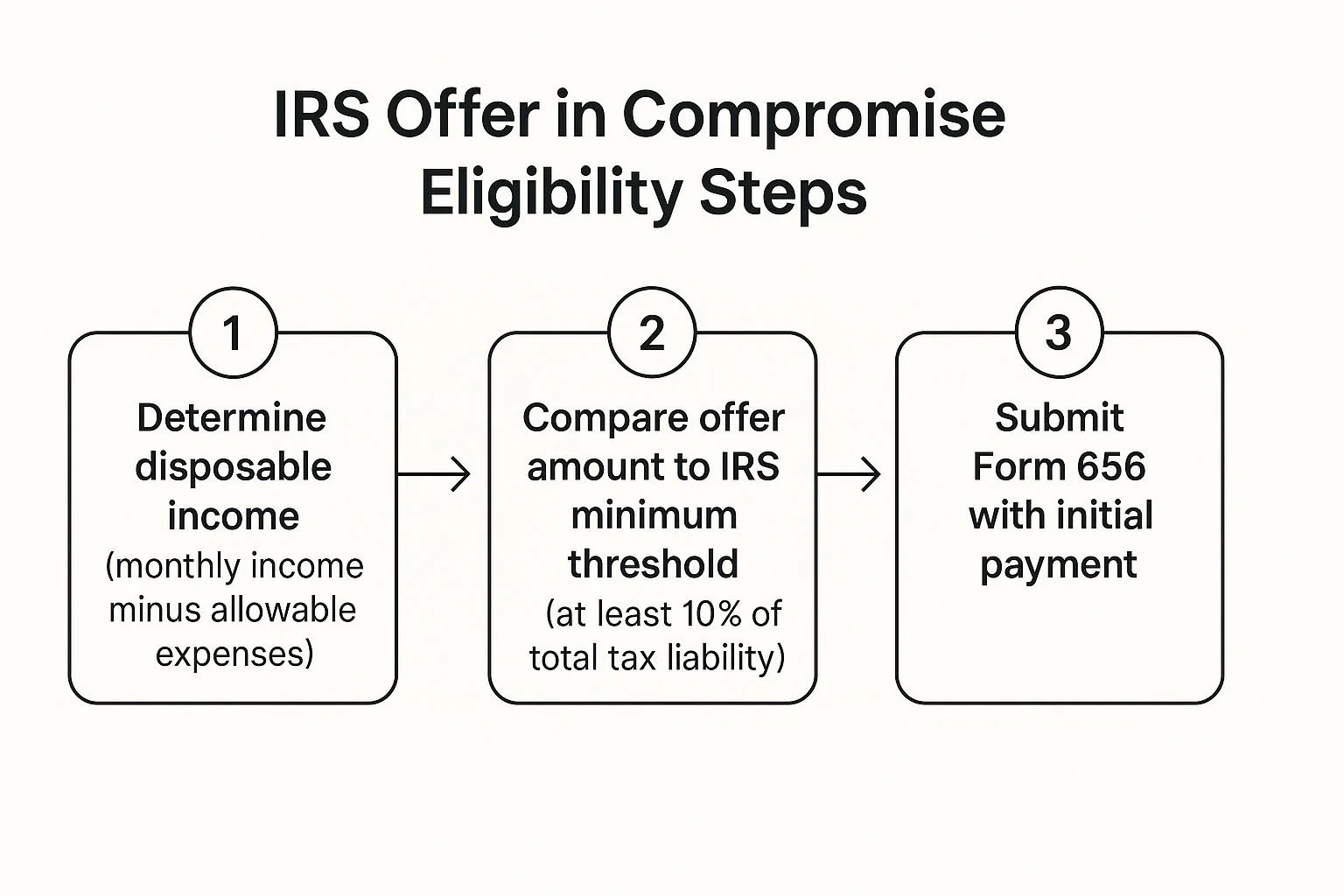
Your Future Income: The IRS takes your monthly income, subtracts a set amount for allowable living expenses (not necessarily your actual expenses), and multiplies that leftover amount by a number of months into the future.
The IRS Offer in Compromise calculator is designed to help you run these numbers and get a rough estimate of your RCP before you commit to the lengthy formal application.
Is the OIC Program Right for You?
The OIC program has some strict, non-negotiable entry requirements. Before the IRS will even glance at your application, you have to be in good standing. This is a critical point that many people miss.
The entire point of an OIC is to find a fair resolution based on financial reality, not wishful thinking. It’s a compromise for taxpayers facing legitimate hardship, balanced against the government's need to collect taxes.
Before you even think about filling out forms or using the calculator, you need to clear a few hurdles. I’ve seen many taxpayers spend time and money on an application only to have it rejected immediately because they missed one of these basic requirements.
Here’s a quick rundown of the checkpoints you absolutely must pass first.
Key Eligibility Checkpoints for an Offer in Compromise
| Requirement | What It Means for You | How to Confirm Your Status |
|---|---|---|
| Filed All Tax Returns | You must have filed all legally required federal tax returns. The IRS won't negotiate if you're not fully caught up on your filings. | Log into your IRS online account or contact a tax professional to review your filing history. |
| Received a Bill | You must have received a formal bill (a notice) for at least one of the tax debts you want to include in your offer. | Check your mail for recent IRS notices like a CP14 or a Notice of Federal Tax Lien. |
| Current on Tax Payments | You must be current with all tax payments for the current year. This includes quarterly estimated tax payments or sufficient payroll withholding. | If you're self-employed, confirm you've made your required estimated payments. If you're an employee, check your pay stubs for withholdings. |
| Not in Bankruptcy | You cannot be in an open bankruptcy proceeding. The bankruptcy court has jurisdiction over your debts, not the IRS OIC unit. | Your offer must be submitted before you file for bankruptcy or after your case is fully discharged. |
Getting these basics in order is your true first step. Once you’ve confirmed you meet these criteria, you can then proceed with confidence.
As of 2025, submitting an OIC application comes with a $205 fee and an initial payment based on your offer amount. While low-income taxpayers might get these waived, it’s an upfront cost for most.
After you apply, the IRS will dig deep into your ability to pay, your income, your expenses, and your asset equity to determine if your offer is the most they can hope to collect. You can learn more about these IRS requirements directly on their site.
Using The Official IRS Pre-Qualifier Tool
Before you start digging through stacks of financial records or write a check for the non-refundable application fee, your first move should always be the official IRS Offer in Compromise Pre-Qualifier tool. It's a free, online resource that acts as a quick litmus test.
Think of it as a financial check-up. It gives you an immediate, albeit preliminary, signal on whether you might even be in the ballpark for an OIC.
It saves you a ton of time and potential heartache down the road. The tool is designed to be pretty simple, guiding you through a series of questions about your finances to give you that initial verdict.
So you know you're in the right spot, here’s what the landing page looks like.
Getting this part right is your first step toward an accurate estimate from the IRS Offer in Compromise calculator.
What The Pre-Qualifier Asks (And Why It Matters)
The questions in the pre-qualifier aren't just for show. They directly mirror the key factors the IRS uses in its eligibility formula. Every number you plug in is a piece of the puzzle that helps calculate a rough version of your Reasonable Collection Potential (RCP).
You'll need to have some basic financial info ready:
Total Tax Debt: This is the starting point for the whole equation.
Household Size and Location: The IRS doesn't expect a family of four in Los Angeles to live on the same budget as a single person in rural Ohio. This information helps determine your allowable monthly living expenses based on national and local standards.
Total Monthly Household Income: This means all sources of income, not just your W-2 job. Think side hustles, freelance gigs, or any other money coming in. It's critical for figuring out your ability to make payments.
Total Available Cash: The IRS will want to know what you have sitting in checking, savings, or other liquid accounts.
Asset Information: You'll need to provide the value of things like your car, home, and any investments. The IRS is specifically looking at the equity you hold in these assets.
My Advice: Be brutally honest with your numbers. The pre-qualifier is an anonymous tool, so there's zero benefit to fudging the figures. Putting in bad information will only give you a false sense of hope or an incorrect rejection, which just wastes everyone's time.
The core of an OIC really boils down to a simple comparison: what the IRS thinks you can afford to pay versus the total amount you owe.
A Real-World Scenario
Let’s take a freelance graphic designer I once worked with. Her income was all over the place. One month, she might pull in $8,000, but the next could be a lean $3,000.
When she went to use the IRS Offer in Compromise calculator, she knew better than to just plug in her best or worst month. Instead, we calculated her average monthly income over the past year to give the IRS a much more realistic picture of her financial reality.
This kind of careful preparation is essential. It provides a more reliable result and helps you understand if this path is even viable before you've wasted your time and the $205 application fee.
Gathering Your Financials for an Accurate Result

The IRS Offer in Compromise calculator is a fantastic starting point, but let’s be clear: its results are only as good as the numbers you put in. Garbage in, garbage out.
If you rush through it with ballpark figures, you're going to get a misleading estimate. This can lead to false hope and a wasted $205 application fee down the road. You want a trustworthy result, and that starts with careful prep work.
Think of this as building the case you'll eventually present to an IRS agent. Getting organized now isn't just about the calculator; it’s about setting yourself up for success when you fill out the actual Form 433-A. It makes the whole ordeal much less painful.
Your Financial Documentation Checklist
Before you even think about opening the calculator, you need to pull together some paperwork. Having everything in a folder right next to you will make this process a thousand times easier and more accurate.
Here's what you'll need to track down:
Proof of Income: Grab your pay stubs from the last three to six months. If you're self-employed or your income bounces around, you'll want bank statements or profit-and-loss reports for that same timeframe.
Bank and Investment Statements: You need the most recent statements for everything—checking, savings, brokerage accounts, and any retirement funds like a 401(k) or IRA.
Major Asset Information: Make a list of your big-ticket items like your home, cars, or other property. You'll need to find their fair market value and what you still owe on them.
Monthly Expense Records: Compile what you actually spend on core living costs. This means rent or mortgage payments, utility bills, car payments, gas, and groceries.
The IRS looks at a blend of your actual expenses and their own national and local standards. It’s critical to have your real numbers documented, but just know that the final OIC formula is based on what the IRS considers "allowable," which may not match your spending habits.
Calculating Your Income and Expenses
Got your documents? Great. Now it's time to crunch the numbers the calculator asks for. The IRS wants to see averages to smooth out any wild swings in your financial picture, especially for anyone with irregular income.
Even if it feels basic, reviewing some small business accounting basics can be a huge help here, as the principles apply to personal finances, too.
For instance, if you’re a freelancer who landed a huge project last month, you can't just use that one high invoice as your monthly income. You need to add up your total income from the last six months and divide by six. That's your average.
The same goes for expenses. If you pay a big insurance premium once a year, divide that total cost by twelve to figure out the average monthly hit. This is the kind of clear, consistent financial story the IRS needs to see.
Making Sense of Your Calculator Results
So, you’ve plugged in all your financial details, hit "calculate," and now you have a result. It might be a specific dollar amount, or maybe it’s a message nudging you toward other tax resolution options.
Think of this initial number not as a final verdict, but as a powerful preview of where you stand with the IRS.
The figure you see is a rough estimate of your Reasonable Collection Potential (RCP). The IRS isn't just pulling this number out of thin air; it comes from a specific, albeit simplified, formula.
It's their best guess at the maximum amount they believe they could squeeze out of you if they pursued every collection avenue available.
Breaking Down the Calculator's Math
To really understand the result, you need to see how the calculator gets there. It’s all about two core parts of your financial life.
The entire RCP calculation really boils down to this:
Your Net Equity in Assets: This is what you own outright. The calculator looks at the current market value of your assets—things like cash, cars, and real estate—and subtracts what you still owe on them, like a car loan or mortgage.
Your Future Income Potential: Here, the tool takes your average monthly income and subtracts a standardized, non-negotiable amount for allowable living expenses. That leftover bit of disposable income is then multiplied by either 12 or 24 months, depending on the payment timeline of the offer.
In short, the calculator adds what you have now (your assets) to what you could afford to pay over the next one to two years (your future income). We take a much deeper dive into this in our guide on the IRS Offer in Compromise formula.
The result from the IRS Offer in Compromise calculator is a crucial first look at your eligibility. It’s based on the same logic an IRS agent will use, giving you a vital preview of how they view your financial situation.
When the Calculator Suggests You May Qualify
If the tool spits out an estimated offer amount, that's a good sign. It means that based on the numbers you provided, you look like a potential candidate for the OIC program. Consider this your green light to start the formal application process.
Your next move is to tackle Form 656, Offer in Compromise, and its very detailed companion, Form 433-A (OIC). The real work begins now. All the information you gathered for the pre-qualifier tool is just the foundation; for the real application, you'll need to provide extensive documentation to prove every single number you claim.
When the Calculator Points to Other Options
Don't panic if the calculator says you probably don't qualify. This isn’t a dead end. It usually just means your calculated RCP is high enough that the IRS believes you could pay your full tax debt over time. In these cases, the tool often suggests looking into an Installment Agreement.
Honestly, this result can be a blessing in disguise. It just saved you the non-refundable $205 application fee and the massive amount of time and effort that a formal OIC application demands.
The OIC program is specifically for taxpayers whose financial situation makes it impossible to pay in full. Getting approved often depends on having a low adjusted gross income (AGI) relative to your family size and where you live.
You can find more on the nitty-gritty of this on the IRS page for Offer in Compromise eligibility details. An "unfavorable" result from the calculator is really just helpful guidance, steering you toward a solution that's a better fit—and more achievable—for your situation.
Common Mistakes When Using The Calculator

At first glance, the IRS Offer in Compromise pre-qualifier tool seems simple enough. But I’ve seen countless people get tripped up by what seem like minor details, only to have their formal application rejected months later.
Those small errors can paint a completely misleading picture of your finances, costing you time and that non-refundable application fee.
Navigating this tool requires a sharp eye. The most common slip-ups I see are undervaluing assets, claiming expenses the IRS won't allow, and simply forgetting to include certain income streams. Each one of these can torpedo your chances before you even get started.
The biggest mistake you can make is treating the calculator's result as a guarantee. It's only an estimate, and its accuracy is 100% dependent on the numbers you plug into it.
Let's walk through the most common pitfalls I see in my practice. If you can avoid these, your submission will be on much stronger footing from day one.
Underestimating Your Assets
One of the most frequent mistakes is putting down the wrong value for your assets. People often use the "quick sale" value for their car or just guess what they think their home is worth. This isn't how the IRS sees it; they look for the fair market value.
Don't forget, the IRS does its own homework. If they discover you have more equity in your home or vehicle than you reported, it's a fast track to rejection.
To get a better handle on how your assets factor in, take a look at a complete guide to tax debt settlement, which provides a much broader view of the entire OIC process.
Overstating Your Monthly Expenses
This is probably the single biggest error I see. Here’s the hard truth: the IRS doesn't really care what you actually spend each month. They operate on a strict set of national and local standards for what they consider allowable living expenses. You can't claim your $600 monthly car payment if their standard for your area is only $500.
Real-World Scenario: A client in a high-cost city reports their actual food and utility bills, which are about $400 higher than the local IRS standard.
The Impact: This makes the calculator spit out a falsely low offer amount because it looks like they have less disposable income than the IRS will give them credit for.
The Fix: You have to use the IRS's own Collection Financial Standards. Look up the allowable amounts for your specific county and household size before you even touch the calculator.
Forgetting All Income Sources
It’s tempting to just punch in the numbers from your main W-2 job and call it a day. But the IRS looks at everything. That freelance work you do on the weekends? The rent you collect from a spare room? Even regular cash you get from a relative to help with bills? It all counts.
Leaving out these secondary income streams makes it seem like you have a lower ability to pay than you really do. When the IRS examiner gets your case and starts pulling bank statements, they will find this income. At that point, your offer is dead on arrival. For an accurate estimate, you have to include every single dollar coming into your household.
Common Calculator Errors and How to Fix Them
I've put together this quick-reference table to highlight the most common input mistakes I see and, more importantly, how to get them right from the start.
| Common Mistake | Why It's a Problem | The Correct Approach |
|---|---|---|
| Using the "quick sale" value for a car. | The IRS uses Fair Market Value (FMV), so this understates your equity and can lead to immediate rejection. | Look up the private party value on a site like Kelley Blue Book, not the trade-in value. |
| Listing all actual monthly expenses. | The IRS only allows standardized amounts for most expenses, regardless of what you actually spend. | Use the official IRS Collection Financial Standards for your specific location and household size. |
| Forgetting side-gig or cash income. | The IRS will find this income when reviewing your bank records, creating a fatal flaw in your application. | Include all sources of income, including freelance work, rental income, and even regular family support. |
| Incorrectly calculating household size. | Claiming too many or too few dependents can skew the expense standards you're allowed to use. | Only include dependents you can legally claim on your tax return. |
Getting these details right isn't just about following the rules; it's about presenting a realistic and credible financial picture to the IRS. A sloppy calculation is a red flag for the examiner reviewing your case.
Common Questions About the IRS OIC Calculator
Running the numbers through the IRS Offer in Compromise calculator often brings up more questions than it answers. That's completely normal. Let's walk through some of the most common things people ask after they get their results so you can figure out what to do next.
What if the Calculator Says I Don't Qualify?
Seeing a "does not qualify" message can feel like a gut punch, but don't let it discourage you. It's not the final word.
All this result means is that, based on the numbers you plugged in, the IRS believes you can afford to pay off your tax debt over time. In their eyes, other solutions are a better fit. Honestly, this is valuable feedback. It saves you the non-refundable $205 application fee and months of waiting, only to have your OIC rejected.
Now you can pivot and explore options that are more likely to get approved:
Installment Agreement: This is the most common path forward. You agree to make manageable monthly payments for up to 72 months to clear what you owe.
Currently Not Collectible (CNC) Status: If you're in a tough spot financially and truly can't afford any monthly payment, the IRS might agree to pause collections temporarily.
Does Using the OIC Calculator Lock Me into Applying?
Not at all. Think of the IRS pre-qualifier tool as a free, anonymous financial check-up. It's purely for your information.
Using it doesn't commit you to anything. The IRS isn't tracking your entries or flagging your account. The tool's only job is to give you a rough, non-binding preview of how the IRS might view your finances. There's zero pressure or obligation.
The calculator is a compass, not a contract. It points you in a potential direction, but it doesn't force you to take the journey. Use it to explore different scenarios and get a feel for the process.
How Long Does the Real OIC Process Take?
This is where expectations can really get out of whack. The calculator gives you an answer in minutes, but the official OIC process is a marathon, not a sprint.
Once you submit your formal application—the Form 656 package—get ready to wait. The review process typically takes anywhere from six to nine months, and sometimes even longer.
During that entire time, you have to stay perfectly compliant with all your tax duties. That means filing all your returns on time and making any required estimated tax payments. If you fall behind and rack up new tax debt while your offer is pending, the IRS can automatically reject it.
The OIC program is still a go-to tool for many taxpayers. In fiscal year 2024, the IRS Office of Chief Counsel accepted 2,918 OICs in criminal cases, plus another 46 other approved offers. There's even legislation in the works, like the Taxpayer Assistance and Service (TAS) Act, aimed at streamlining the process. But for now, patience is key.
At Attorney Stephen A Weisberg, we know every tax problem has its own story. We don't use a one-size-fits-all approach. Instead, we start with a FREE Tax Debt Analysis to map out the best path forward for you. If you need an expert in your corner, contact us today to see how we can help.
➥ Contact Attorney Stephen A. Weisberg for a free Tax Debt Analysis.
Contact Me Here: https://www.weisberg.tax/contact-1
Email: s.weisberg@weisberg.tax
Phone/Text: (248) 971-0885
Address: 300 Galleria Officentre, Suite 402, Southfield, MI 48034
